
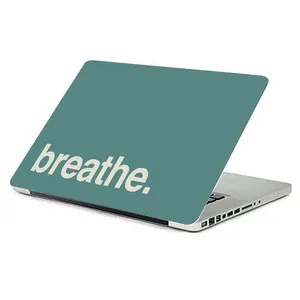
Laptop Skin Stickers
What Are Laptop Skin Stickers?
Laptop skin stickers are thin, vinyl decals designed to adhere to the lid or other parts of your laptop. Unlike bulky covers, these skins give you a style upgrade while protecting your device from scratches, scuffs, and minor wear — all without adding much weight.
Why Use Them?
-
Personalization: Choose from a wide variety of designs — abstract, gaming, cultural, or plain textures.
-
Protection: Quality vinyl protects against surface scratches.
-
Removability: Most are made with adhesive that doesn’t leave sticky residue when peeled off.
-
Water‑Resistant: Many use materials like PVC or high-grade vinyl that resist water. Affordable Customization: Compared to full wraps, skin stickers are a cost-effective way to refresh your laptop’s look.
Things to Consider Before Buying
-
Material Quality: Choose premium vinyl — good ones are durable and leave no residue. Coverage: Decide if you want a sticker for the lid only, or full skin for the sides and keyboard area.
-
Design & Finish: Options include matte, glossy, carbon-fiber texture, or patterned designs. For example, LaptopStickerBD offers a “Texture Carbon” skin for modern protection and style.
-
Heat & Ventilation: Make sure not to cover air vents. Some users note that thin vinyl skins do not significantly affect cooling, but very tight wraps can.
-
Application: Clean the surface well before applying. Use a card (like an ATM card) to smooth out bubbles
Tips for Application & Maintenance
-
Wipe your laptop lid clean with isopropyl alcohol before applying.
-
Apply slowly from one side to reduce air bubbles.
-
Use a soft card (like an ATM card) to smooth out bubbles.
-
If you need to remove it, heat lightly (with a hairdryer) — this helps loosen the adhesive.
-
Re-apply carefully — skin stickers can stretch or tear if removed improperly.
ল্যাপটপ স্কিন স্টিকার (Laptop Skin Stickers)
ল্যাপটপ স্কিন স্টিকার কী?
আপনার ল্যাপটপের লিড বা বডি অংশে লাগানোর জন্য ডিজাইন করা পাতলা ভিনাইল স্টিকার। এগুলো স্টাইল এবং সুরক্ষা দুইই নিয়ে আসে — স্ক্র্যাচ ও স্কাফস এড়ায় এবং হালকা হলেও দারুণ লুক দেয়।
কেন ব্যবহার করবেন?
-
পারসোনালাইজেশন: অ্যাবস্ট্রাক্ট, গেমিং, টেক্সচার ডিজাইনসহ অনেক থিম পাবেন।
-
সুরক্ষা: ভিনাইল স্কিন স্ক্র্যাচ থেকে রক্ষা করে।
-
রিমুভ করা যায়: ভালো সব স্টিকার রেসিডিউ ছাড়াই সহজেই ওঠে।
-
ওয়াটার-রেসিস্ট্যান্ট: অনেক স্টিকার পানির প্রতিক্রিয়া দেয় না।
-
সহজ কাস্টমাইজ: ফুল কভার দায় না দিয়ে কম দামে ল্যাপটপ নতুন ডিজাইন পায়।
কেনার আগে যা খেয়াল রাখবেন
-
ম্যাটেরিয়াল: প্রিমিয়াম ভিনাইল বেছে নিন — দীর্ঘস্থায়ী এবং জমে না।
-
কভারেজ: শুধু লিডের জন্য চান নাকি পুরো বডি কভার করবেন?
-
ডিজাইন ও ফিনিশ: ম্যাট, গ্লসি, কার্বন-টেক্সচার বা প্যাটার্ন — পছন্দ অনুসারে বেছে নিন। উদাহরণস্বরূপ, LaptopStickerBD-এ কার্বন স্কিন পাওয়া যায়।
-
হিট এবং ভেন্টিলেশন: খুব ঘন কন্টিপ্যাকিং করলে হিট বাড়তে পারে, তাই ভেন্ট গুলোর দিকে নজর দিন। অ্যাপ্লিকেশন: লাগানোর আগে ল্যাপটপ ভালোভাবে পরিষ্কার করুন। কার্ড দিয়ে বুদ্বুদ সরান।
লাগানোর ও রক্ষণাবেক্ষণের টিপস
-
লাগানোর আগে ল্যাপটপ পরিষ্কার করে আইসোপ্রোপাইল অ্যালকোহল ব্যবহার করুন।
-
ধীরে ধীরে লাগান এবং বুদ্বুদ কমাতে কার্ড ব্যবহার করুন।
-
যদি এড়িয়ে ওঠাতে চান, হালকা হিট (হেয়ার ড্রায়ার) দিন অ্যাডহেসিভ নরম করার জন্য।
-
সরানোর সময় দ্রুত অঁচড়বেন না — স্কিনটা স্ট্রেচ বা ছেঁড়া হয়ে যেতে পারে।